


You’ve heard the buzz about AI. Maybe your grandkids mention ChatGPT at dinner. Maybe you’ve seen news segments about robots writing essays and creating art.
And maybe you’ve thought: That’s interesting, but what does it have to do with me?
A lot, actually. More than you’d expect.
This guide is going to walk you through what AI personal assistants really are (spoiler: they’re not Alexa), what they can actually do for you in your daily life, and how to get started without any tech headaches.
No jargon. No hype. Just straight answers from people who set these up for a living. Whether you consider yourself a senior or simply an adult over 55 who wants to stay sharp, this guide is for you.
What is an AI personal assistant? (And why should you care?)
Let’s clear something up right away.
When we say “AI personal assistant,” we’re not talking about Siri or Alexa. Those are voice-activated speakers that can play music, set timers, and tell you the weather. They’re useful, sure. But they’re basic.
A real AI personal assistant is more like a personal secretary that never sleeps.
Think about what a great executive assistant does. They manage your calendar. They sort your mail. They remind you about appointments. They research things for you. They draft letters. They keep track of bills and deadlines.
Now imagine all of that, running quietly on your phone, tablet, or computer. Available any time you need it. Patient. Never in a rush. And it actually learns your preferences over time.
That’s what a modern AI assistant does.
Here’s how it’s different from what you might already use:
- Siri/Alexa/Google: Answers individual questions. No memory of your life. Forgets you the moment the conversation ends.
- AI personal assistant: Knows your schedule, your preferences, your routines. Manages ongoing tasks. Gets better the more you use it.
Think of it this way. Alexa is like calling 411. An AI personal assistant is like having a concierge who knows your name, your room, and that you prefer the table by the window.
“But what about ChatGPT and Claude?”
Great question. You’ve probably heard of ChatGPT, Claude, or other AI chatbots. They’re impressive — you can ask them questions, get help writing an email, or have a conversation. But there’s a catch.
They can’t actually do anything for you.
ChatGPT can draft an email, but it can’t send it. It can suggest a calendar event, but it can’t create one. It can tell you your electric bill is probably due soon, but it has no idea when it’s actually due because it’s not connected to your life.
A true AI personal assistant — built on platforms like OpenClaw — is the next evolution. It doesn’t just talk. It acts. It connects to your real email, your real calendar, your real accounts, and completes real tasks on your behalf.
Here’s the difference at a glance:
- ChatGPT / Claude: Answer questions and generate text. No connection to your accounts. Can’t take action. You still have to do the work yourself.
- AI personal assistant (OpenClaw-powered): Connected to your email, calendar, and services. Sends emails, schedules appointments, tracks bills, flags scams — all on its own. It’s not a chatbot. It’s a digital employee that works for you.
Think of ChatGPT as a really smart friend you can call for advice. An AI personal assistant is someone who shows up at your house, opens your mail, sorts your bills, and says “I already handled it.”
That’s the leap. And that’s what ClearSetup AI sets up for you.
🎯 Key Takeaway: An AI personal assistant isn’t a chatbot, a gadget, or a voice speaker. It’s software that connects to your real accounts, manages your digital life, learns your habits, and completes actual tasks so you don’t have to.
Why 2026 is the year to get started
If you’ve been on the fence about AI, this is the year the math changes.
The technology has gotten dramatically better, dramatically cheaper, and dramatically easier to use. Two years ago, these tools were mostly for programmers and tech enthusiasts. That’s no longer the case.
The numbers tell the story.
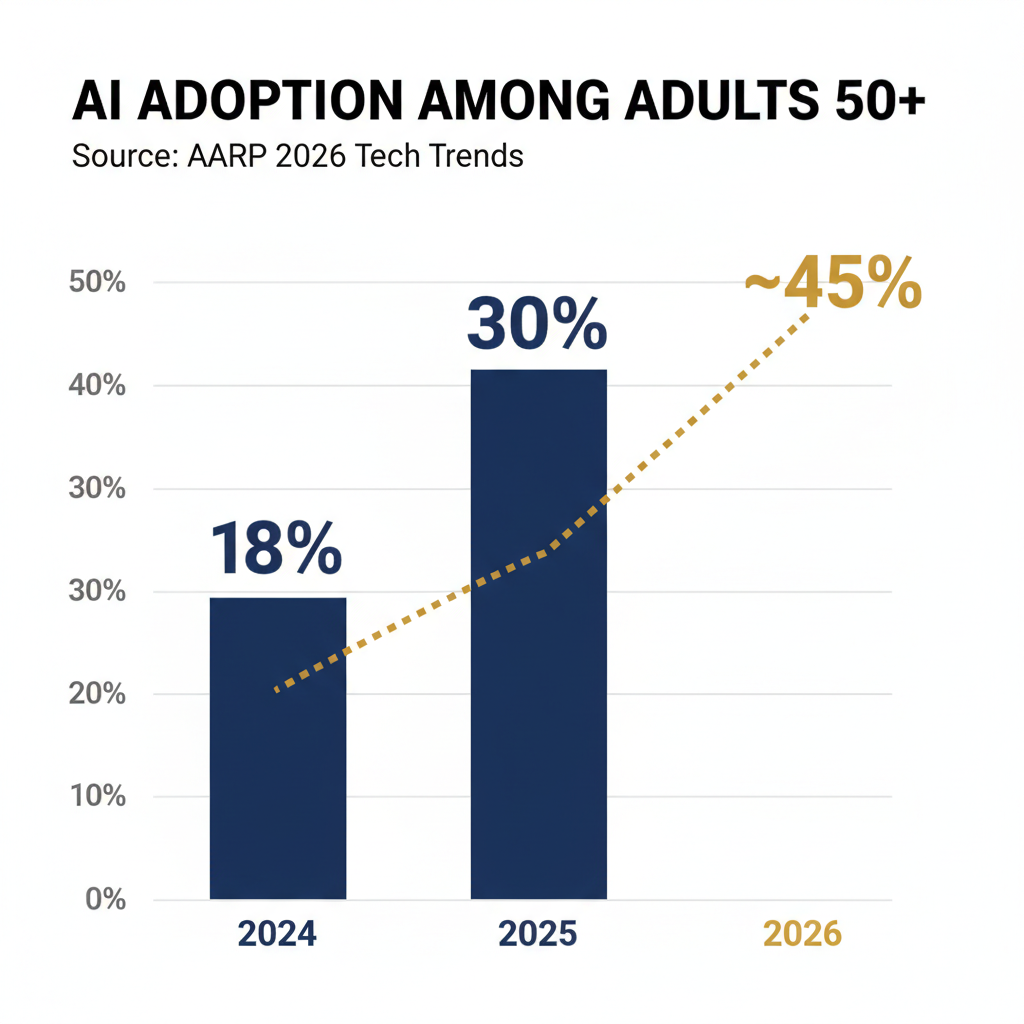
According to AARP’s 2026 Technology Trends report, AI usage among adults 50 and older nearly doubled in just one year, jumping from 18% in 2024 to 30% in 2025. That’s millions of people your age who decided to give it a try.
And they’re not just dipping a toe in:
- 48% of adults 50 and older now use predictive text (the suggestions that pop up when you type)
- 38% use AI to find answers to questions
- 36% use virtual assistants regularly
- 71% bought some form of technology in 2025
- 40% plan to buy more tech in 2026
Smart home technology ownership among adults 50+ has nearly tripled, going from 10% in 2019 to 27% in 2024. A University of Michigan poll found that 55% of people age 50 and older have already used some form of voice AI.
Here’s the thing: this isn’t a fad. It’s a shift.
And the people who get comfortable with these tools now will have a real advantage. Not just a tech advantage — a practical, quality-of-life advantage.
The gap between people who use AI well and people who don’t is getting wider every month. Two years from now, managing healthcare portals, banking apps, travel bookings, and government services without some AI help will feel like trying to run a business without email in 2010.
You could still do it. But why would you?
💡 Pro Tip: You don’t need to be an early adopter or a techie. The sweet spot is actually *right now* — the tools are mature enough to be useful, simple enough to learn, and affordable enough to try without risk.
What can an AI assistant actually do for you? (The practical stuff)
This is the section most people skip to. Fair enough. Let’s get specific.
Email management
Your inbox is probably a mess. No judgment — everyone’s is.
An AI assistant can sort your email into categories (bills, family, newsletters, spam), flag anything that needs a reply, and even draft responses for you. You review what it wrote, make changes if you want, and hit send.
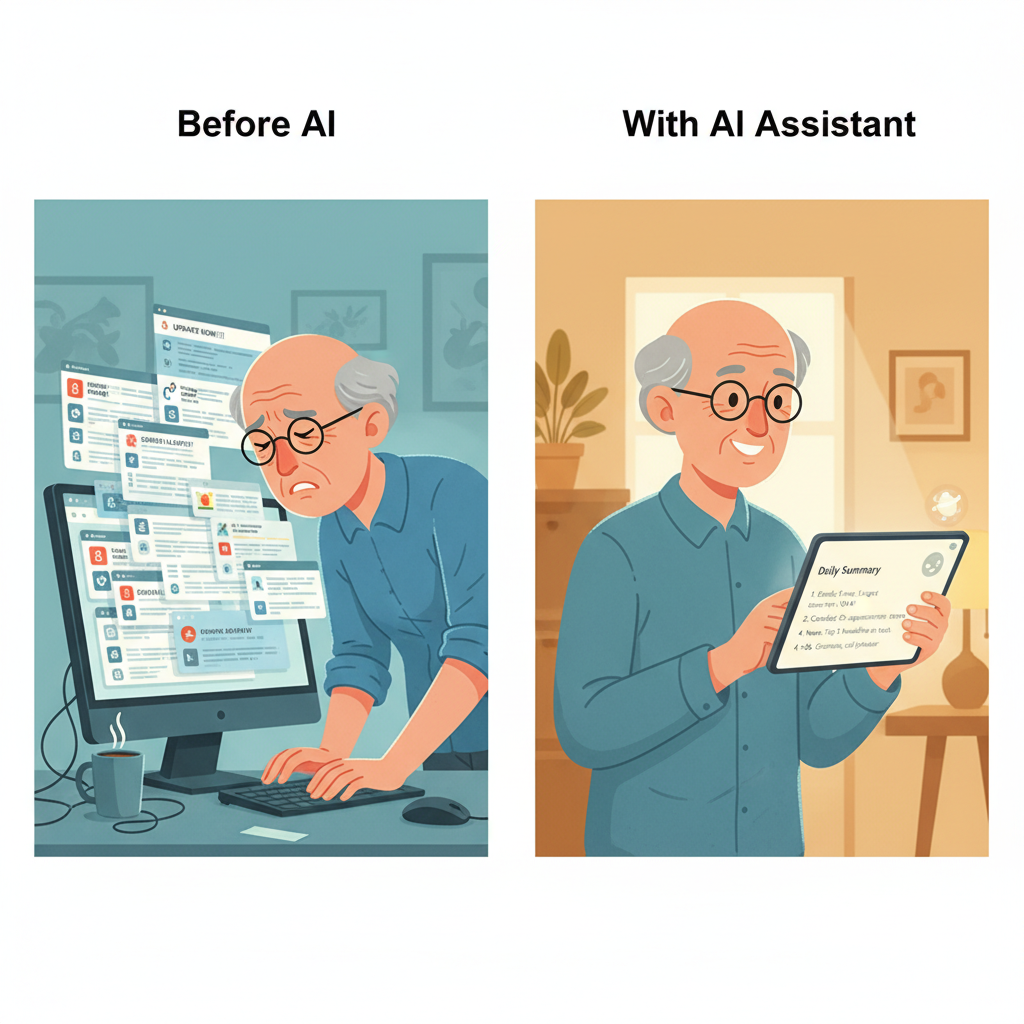
Picture this: you wake up, and instead of 47 unread emails, you see a summary. “You got three emails that need a response. Your electric bill is due Friday. Your daughter sent photos from the weekend. Everything else is newsletters and promotions.”
That’s a Tuesday morning with an AI assistant.
Calendar and schedule management
“When’s my dentist appointment? Did I schedule that lunch with Barbara?”
Your AI assistant knows. It manages your calendar, sends you reminders, and can even help you schedule new appointments. Tell it “find me a time to meet with my financial advisor next week” and it checks your calendar, suggests open slots, and sends the invite.
Medication and health reminders
This one matters. A lot.
Medication reminders that actually work. Not just a phone alarm that you swipe away — a smart reminder that confirms you took your medication, flags if you missed a dose, and keeps a log your doctor can review.
Your AI can also remind you about upcoming medical appointments, prompt you to refill prescriptions before they run out, and help you prepare questions for your next doctor visit.
Bill tracking and financial organization
When’s the mortgage due? Did the insurance payment go through? How much did you spend on dining out this month?
An AI assistant tracks due dates, flags unusual charges, and gives you a clear picture of where your money is going. Think of it as a filing cabinet that organizes itself and taps you on the shoulder before you miss a payment.
Morning briefings
This is the feature people fall in love with first.
Every morning, you get a quick summary: today’s weather, your schedule, any important emails, news headlines that match your interests, and reminders for the day. It takes 90 seconds to read. It replaces 20 minutes of checking five different apps.
Restaurant reservations and travel help
“Find me an Italian restaurant near the theater for Saturday night. Something quiet, not too expensive.”
Done. Your AI finds options, shows you reviews, and can make the reservation. Planning a trip? It can research destinations, compare flights, find hotels, and even build a day-by-day itinerary based on what you tell it you enjoy.
Finding information and answering questions
This is where AI really shines compared to Google.
Instead of typing a search query and scrolling through 10 blue links (half of which are ads), you just ask a question in plain English. “What are the side effects of metformin?” “What’s the best time to visit Portugal?” “How do I contest a charge on my credit card?”
You get a clear, direct answer. Not a page of links. An actual answer.
Staying connected with family
Your AI can help you send messages, schedule video calls, share photos, and keep track of birthdays and events. If typing is difficult, you can just talk to it and it’ll handle the rest.
Some people use their AI assistant to send a quick daily message to their grandkids. Others use it to coordinate family dinners. The point is that it removes the friction from staying in touch.
🎯 Key Takeaway: An AI assistant isn’t one trick. It handles email, calendars, health reminders, finances, morning briefings, travel planning, research, and family communication. Start with one or two features that would make your day easier.
The real value: Less admin, more time, less stress
Let’s talk about what actually changes when you add an AI assistant to your daily life.
You’re not struggling. You’re busy. Between managing a household, staying on top of finances, coordinating with family, handling insurance, and keeping track of everything that lands in your inbox — the admin work alone can eat hours out of every week.
That’s the problem AI solves. Not a lack of ability — a lack of hours.
Instead of spending 45 minutes on hold with your insurance company, your AI assistant handles the call logic, files the claim, and gives you a two-sentence update. Instead of cross-referencing three calendars to find a good weekend for a family visit, you ask once and get options.
This isn’t about needing help. It’s about choosing not to waste time on busywork when something else can handle it faster.
Think about what that means day to day:
- Your finances stay organized without the Sunday night spreadsheet session
- Medical appointments, prescriptions, and insurance get handled in the background
- Travel gets booked in minutes, not days
- Customer service headaches get resolved without you sitting on hold
- Bills, deadlines, and obligations get tracked automatically
That’s what this is really about. Getting hours back. Cutting the stress. Having one less thing on the to-do list every single day.
The world runs on admin work. Apps, portals, forms, phone trees — the systems keep getting more complicated, and none of us signed up to be full-time paperwork managers.
An AI assistant takes that load off your plate so you can spend time on what actually matters to you.
The World Health Organization projects that the global population aged 60 and older will reach 2.1 billion by 2050. Starting in January 2026, baby boomers begin turning 80. About 10,000 people a day will cross that threshold for the next 20 years.
This generation — your generation — is the largest group of adults 55 and over in history. The systems being built right now are being built for you. AI personal assistants are a big part of that.
💡 Pro Tip: Start with the tasks that eat the most time or cause the most frustration. That’s where you’ll feel the difference right away.
Security concerns: The elephant in the room
Let’s be honest. You’re right to have concerns about AI and security.
Every time there’s a new technology, scammers find ways to exploit it. And adults over 55 — including seniors — are the number one target.
Here are the numbers, and they’re sobering.
The FBI’s Internet Crime Complaint Center reported that in 2024, adults aged 60 and older lost $4.9 billion to online fraud. That’s 147,127 complaints — a 43% increase from the year before. Source: [FBI IC3]
So yes, the risk is real. Let’s break down the specific concerns:
Data privacy
Any AI assistant that’s useful needs access to some of your information — your calendar, your email, your preferences. The question is: who else can see that data?
With a properly configured setup, your data stays encrypted and private. With a sloppy setup? It might not.
AI hallucinations
AI sometimes makes things up. It presents false information confidently, as if it were true. This is called a “hallucination,” and while it’s gotten less common, it still happens.
For everyday tasks like reminders and scheduling, this isn’t a concern. For medical or financial questions, you should always verify important information with a professional.
Over-reliance
If you rely on your AI for everything and then it goes down, that’s a problem. The solution is simple: use AI as a tool, not a crutch. Keep your own records. Know how to do the basics yourself.
The DIY vs. professional setup problem
Here’s where it gets real.
Setting up an AI assistant yourself means:
- Choosing from dozens of options with no guidance
- Configuring privacy settings you may not fully understand
- Connecting it to your email, calendar, and other accounts without knowing which permissions are safe
- No one to call when something goes wrong
- Potentially exposing your data through misconfiguration
A professional setup means:
- An expert selects the right tools for your specific needs
- Privacy and security settings are configured correctly from day one
- Your accounts are connected safely, with the right permissions
- You get trained on how to use everything
- You have ongoing support when you have questions
The difference matters more than most people realize. Getting AI set up correctly isn’t just about convenience — it’s about protecting yourself from the $4.9 billion fraud industry that specifically targets people over 60.
🎯 Key Takeaway: Security concerns are valid, and you shouldn’t ignore them. The difference between a safe AI setup and a risky one often comes down to how it’s configured. Professional setup eliminates the guesswork and protects your data from day one.
How a professional AI setup service works
You might be wondering: what does a professional AI setup actually look like? What happens when you call someone like ClearSetup AI?
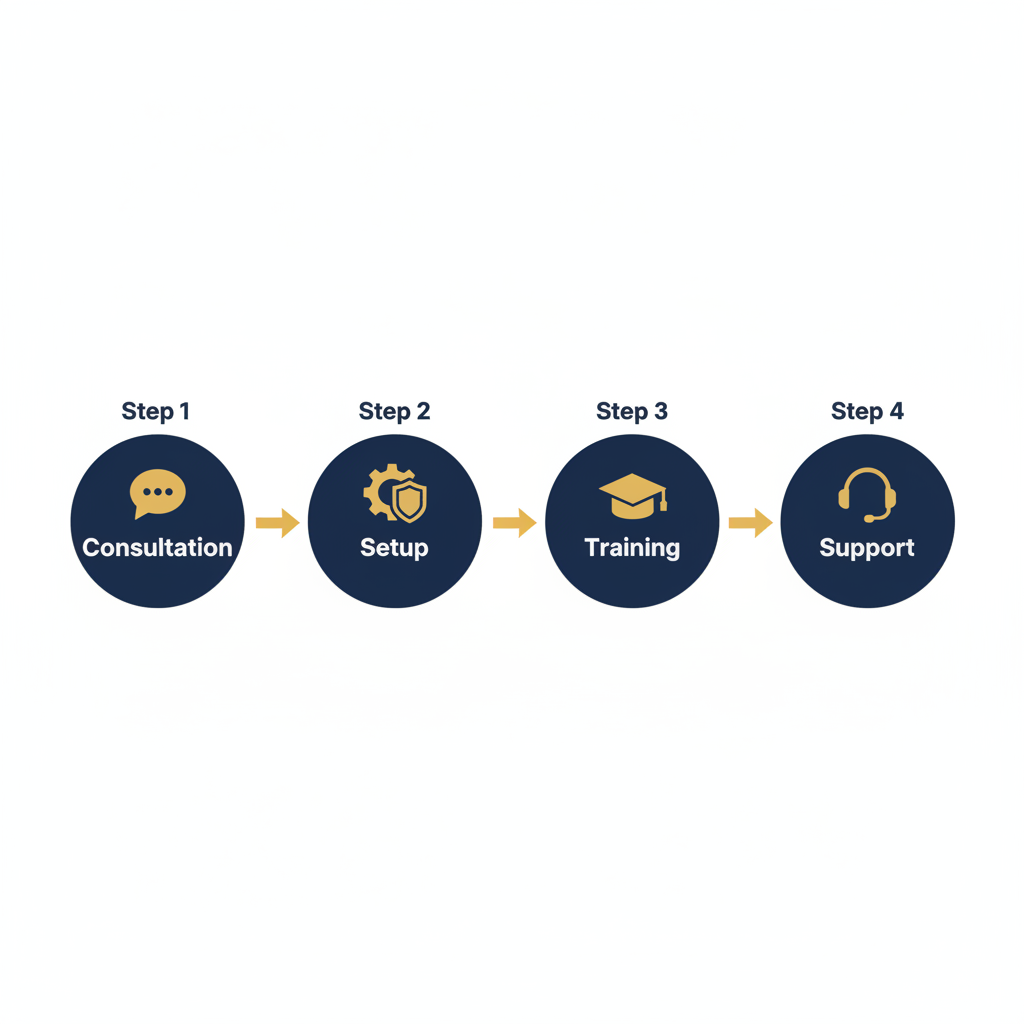
It’s simpler than you’d think. There are four steps.
Step 1: Consultation
A real person talks to you about your life. Not about technology — about your life.
What does your typical day look like? What tasks frustrate you? What are you good at? What do you wish someone would just handle for you?
This conversation determines which AI tools make sense for you. Not everyone needs the same setup. Someone who travels frequently has different needs than someone who mostly stays home. Someone managing multiple medications has different needs than someone who just wants help with email.
Step 2: Setup and configuration
This is the part you don’t want to do yourself. And honestly, you shouldn’t have to.
A specialist configures your AI assistant on your devices. They:
- Install and connect the right tools
- Set up security and privacy protections (following frameworks like NIST cybersecurity standards)
- Connect your email, calendar, and other accounts with safe, minimal permissions
- Configure preferences so the AI works the way you want it to
- Test everything to make sure it works before they leave
Think of it like having a locksmith install your locks instead of doing it yourself. You could do it. But the locksmith makes sure every lock actually works and your house is actually secure.
Step 3: Training
This is the part that makes or breaks the whole thing.
A good setup service doesn’t just install software and leave. They teach you how to use it. In person or by video call, at your pace, with your actual tasks.
You practice sending emails with the AI. You set up your first morning briefing. You add a medication reminder. You ask it a question and see how it responds.
By the end of training, you’re not wondering “how does this work?” — you’re already using it.
Step 4: Ongoing support
Questions come up. Things change. New features come out.
A professional setup service gives you someone to call. Not a 1-800 number with a robot on the other end. A real person who knows your setup and can help.
This is the part that makes all the difference for adults over 55. Knowing that someone has your back takes the anxiety out of using new technology entirely.
💡 Pro Tip: When evaluating any AI setup service, ask three questions: Do you configure security settings? Do you provide hands-on training? Do you offer ongoing support? If the answer to any of those is no, keep looking.
The cost of waiting: Why procrastinating could hurt you
“I’ll figure it out later.”
Most people say this about AI. And for a while, it doesn’t cost them anything. But the longer you wait, the higher the price.
The digital literacy gap is widening
Every month, more services move online. Banks close branches. Doctors use patient portals. Airlines push mobile boarding passes. Government agencies move forms to websites.
If you’re comfortable with technology, each change is minor. If you’re not, each change adds another barrier between you and the things you need.
AI doesn’t just help you with these systems — it helps you keep up as they change.
Scams are getting more sophisticated
Remember those obvious scam emails with bad spelling and suspicious links? They were easy to spot.
AI-powered scams are different. They use perfect grammar, personalized details, and convincing fake websites. The FTC is seeing a surge in AI-generated phishing emails and voice-clone scams that sound exactly like a family member.
Having your own AI assistant is actually one of the best defenses. It can flag suspicious emails, warn you about known scam patterns, and give you a second opinion before you click anything.
The learning curve gets steeper
Learning AI tools in 2026 is easier than it will be in 2028. Not because the tools get harder — because there will be more of them, and they’ll be more deeply integrated into every part of daily life.
Starting now, with one simple assistant, is like learning to drive on quiet streets. Waiting means learning to drive on the highway.
Your support system may change
The family member who helps you with your phone may move. Get busier. Have their own health issues. Your go-to tech-savvy friend may not always be available.
Building your own AI skills now means you won’t be stuck if your support system shifts.
Healthcare is going digital faster than anything
Telehealth. Patient portals. Digital prescriptions. Online test results. Message-your-doctor platforms.
If you can’t navigate these systems, you may miss important health information or delay care. An AI assistant helps you manage all of it in one place.
🎯 Key Takeaway: The cost of waiting isn’t just missing out on convenience. It’s falling behind as the world goes digital, while scams get smarter and support systems get thinner. Starting now is easier than starting later.
Getting started: Your first week with an AI assistant
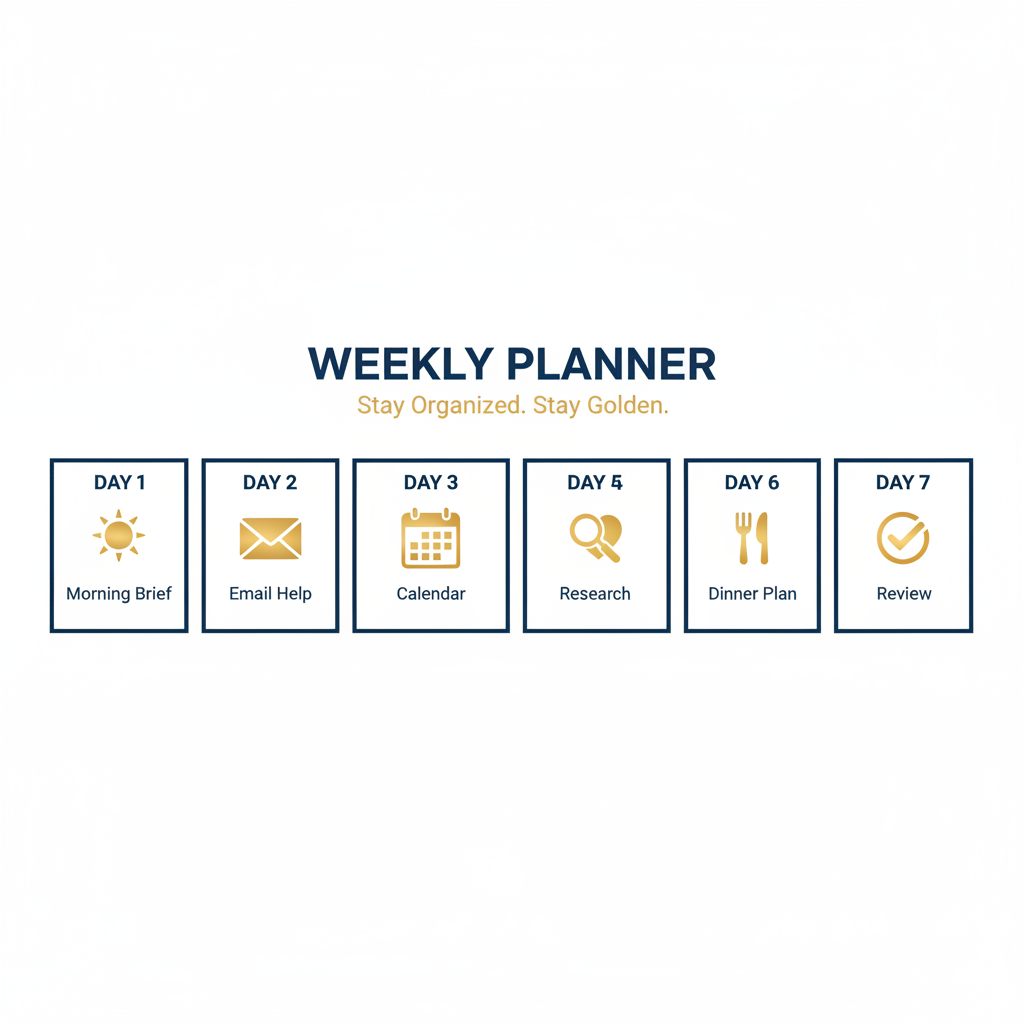
Let’s make this real. Here’s what your first week looks like after your AI assistant is set up.
Day 1: Your first morning briefing
You wake up. You pick up your phone or tablet. Your AI has a summary waiting:
“Good morning. It’s 68°F and sunny. You have a dentist appointment at 2:00 PM. Your electric bill ($142) is due tomorrow. Your son called yesterday and left a voicemail. Today’s top story: [headline that matches your interests].”
That’s it. Ninety seconds. You know everything you need to know about your day.
Day 2: Email help
You open your email and see the AI has organized things overnight. Important emails are on top. Newsletters are in a separate folder. Spam is gone.
You see an email from your insurance company that looks confusing. You ask your AI: “What is this email about?” It reads the email and tells you: “Your insurance company is confirming your coverage renewal. No action needed. Your premium stays the same.”
Done. No stress.
Day 3: Calendar management
You want to schedule lunch with a friend next week. You tell your AI: “Schedule lunch with Barbara on Tuesday or Wednesday.” It checks your calendar, finds that Wednesday is open, and drafts a message to Barbara suggesting 12:30 PM. You approve, it sends.
Day 4: Reminders and health
You set up your medication reminders. Every morning at 8:00 AM, every evening at 8:00 PM. The AI confirms when you’ve taken them and keeps a log.
You also add a reminder to call your doctor’s office next Monday to schedule your annual checkup.
Day 5: Ask it something
You’re curious about a trip to Savannah, Georgia. You ask: “What’s the best time to visit Savannah? What should I see? How much would a week-long trip cost for two people?”
Your AI gives you a clear, organized answer. Best months to visit. Must-see spots. Estimated costs for hotels, dining, and activities. If you want, it can start planning the trip for real.
Day 6: Plan a dinner
Friends are coming over Saturday. You ask your AI for a recipe that serves six, uses ingredients you like, and isn’t too complicated. It gives you three options. You pick one. It generates a shopping list.
If you want, it can even find a local grocery delivery service and order everything for you.
Day 7: Review and adjust
After a week, you and your AI have a rhythm. Some features you use constantly (morning briefings, email sorting). Others you haven’t touched yet.
This is normal. Take a few minutes to turn off anything you don’t want and tweak the things you use. Tell your AI what’s working and what isn’t. It adjusts.
💡 Pro Tip: Don’t try to use every feature in the first week. Start with one or two things that make your morning easier, then add more when you’re ready.
Growing with your AI: From beginner to advanced
One of the best things about an AI assistant is that it grows with you. You don’t need to learn everything at once. In fact, you shouldn’t.
Beginner level (Weeks 1-4)
Start here. Get comfortable with the basics:
- Morning briefings
- Weather and daily schedule
- Simple reminders (appointments, birthdays, medications)
- Asking questions (“What does this word mean?” “What’s the capital of Portugal?”)
- Basic email sorting
At this stage, you’re building a habit. You’re learning to think of your AI when you have a question or need to remember something.
Intermediate level (Months 2-3)
Once the basics feel natural, add more:
- Email drafting (AI writes a first draft, you edit and send)
- Bill tracking and payment reminders
- News summaries tailored to your interests
- Restaurant and reservation help
- Shopping lists and price comparisons
- Video call scheduling with family
This is where most people hit their stride. The AI is saving you 30-60 minutes a day, and you barely notice because it just feels normal.
Advanced level (Months 4+)
Now you’re cooking:
- Full travel planning (flights, hotels, itineraries, packing lists)
- Health monitoring and medical appointment prep
- Document summarization (“Read this 20-page insurance document and tell me what changed”)
- Financial tracking and spending reports
- Helping you write letters, complaints, or formal correspondence
- Coordinating with family calendars
At the advanced level, your AI assistant is genuinely managing parts of your life that used to eat up hours every week.
The jump from beginner to advanced usually takes three to four months. Most people are surprised by how quickly it happens once they get going.
🎯 Key Takeaway: Start with morning briefings and reminders. Build to email and bills. Graduate to travel planning and health management. There’s no rush — the AI is patient and so is the learning curve.
Common misconceptions about AI (Debunked)
Let’s knock down some myths that keep people from getting started.
“AI will replace human interaction”
No. Full stop.
An AI assistant handles tasks — sorting email, setting reminders, looking up information. It doesn’t replace your friends, your family, or your social life.
If anything, it frees up time for human interaction. Instead of spending 30 minutes wrestling with a confusing website, you spend that time calling a friend.
“It’s too expensive”
Most AI assistants cost between $10 and $30 per month. That’s less than a single lunch out. Less than most streaming subscriptions.
The time savings alone — typically 30 to 60 minutes per day — make the math pretty straightforward.
“I’m too old to learn this”
This one drives us a little crazy.
These tools are literally designed to be used by talking or typing in plain English. If you can describe what you want (“remind me to take my pills at 8 PM”), you can use an AI assistant.
There’s no programming. No technical knowledge required. You just ask for what you need in the same language you’d use with another person.
“It’s listening to everything I say”
Modern AI assistants have clear privacy controls. They process what you ask them and nothing more. They’re not recording your conversations, listening through your walls, or reporting to anyone.
That said, privacy settings matter, and they need to be configured correctly. This is one of the big reasons professional setup is worth it — you know your privacy is actually protected, not just theoretically protected.
“AI makes mistakes, so I can’t trust it”
AI does make mistakes. So do humans. So does Google. So does your memory.
The difference is that AI gets better over time. And for routine tasks like reminders, calendar management, and email sorting, the error rate is extremely low.
For anything involving money, health, or legal matters, treat AI the same way you’d treat advice from a friend: useful input, but always verify the important stuff.
“It’s just a fad”
Look at the numbers. Adoption is accelerating, not slowing down. Every major tech company is investing billions in AI. Every industry is integrating it. This isn’t going away.
The question isn’t whether AI personal assistants will be part of daily life. It’s whether you’ll be comfortable using them when they are.
💡 Pro Tip: If you’re hesitant, try one thing for one week. Just the morning briefing. That’s it. Most people who try it for seven days don’t go back.
Frequently asked questions about AI personal assistants for seniors and adults 55+
What is the best AI personal assistant for adults over 55?
The best AI personal assistant for seniors and adults over 55 depends on your specific needs and devices. There’s no single “best” option. A professional setup service like ClearSetup AI evaluates your situation and recommends the right combination of tools for your lifestyle, budget, and comfort level.
How much does an AI personal assistant cost per month?
Most AI personal assistant subscriptions cost between $10 and $30 per month. Professional setup services involve a one-time fee for configuration, training, and security setup. Ongoing support plans vary by provider. The total cost is comparable to a streaming subscription.
Is AI safe for adults over 55 to use?
AI is safe when configured properly. The risks come from poor setup: weak privacy settings, unnecessary data sharing, or misconfigured accounts. A professional setup ensures your data is encrypted, permissions are minimal, and security follows established frameworks like NIST guidelines.
Can AI personal assistants help with medication reminders?
Yes. AI assistants can send medication reminders at specific times, confirm when you’ve taken a dose, track missed doses, and keep a log you can share with your doctor. This is one of the most popular features among adults over 55.
Do I need to be good with technology to use an AI assistant?
No. Modern AI assistants work through plain English conversation. You type or speak what you need, and the AI handles the rest. If you can describe what you want to another person, you can use an AI assistant. Professional setup includes hands-on training at your pace.
Will AI replace my doctor or financial advisor?
Absolutely not. AI is a tool for organization, reminders, and information gathering. It doesn’t diagnose medical conditions, give financial advice, or make decisions for you. Think of it as a very organized assistant that helps you prepare for meetings with your doctor or advisor.
How does an AI assistant protect me from scams?
An AI assistant can flag suspicious emails, identify known scam patterns, verify sender information, and warn you before you click questionable links. It acts as a second pair of eyes on your inbox. Combined with proper security setup, it adds a real layer of protection.
Can I use an AI assistant if I have vision or hearing difficulties?
Yes. AI assistants support screen readers, large text displays, voice input, and voice output. You can interact entirely by speaking, entirely by typing, or a mix of both. A professional setup can configure accessibility features specific to your needs.
What happens if the AI makes a mistake?
AI makes occasional errors, particularly with complex or ambiguous requests. For routine tasks (reminders, calendar, email sorting), mistakes are rare. For important decisions involving health or finances, always verify with a professional. You can correct your AI and it adapts over time.
How do I get started with an AI personal assistant?
The fastest path is a professional setup service. You’ll have a consultation to discuss your needs, get your devices configured with the right tools and security, receive hands-on training, and have ongoing support. You can start benefiting from your AI assistant within days of setup. Visit ClearSetup AI to learn more.
Keep Reading: Related Guides
This ultimate guide covers a lot of ground. For a deeper dive into specific topics, check out these companion articles:
- What’s the Difference Between Siri, ChatGPT, and a Real AI Assistant? — Understand the three tiers of AI and why a true personal assistant is in a different league.
- How AI Protects Adults Over 55 from Online Scams and Fraud — A deep dive into the $4.9 billion fraud problem and how AI fights back.
- Your First Week with an AI Assistant: A Day-by-Day Guide — Exactly what to expect from Day 1 through Day 7.
- 10 Things an AI Personal Assistant Can Do for You This Week — Practical, real-world tasks your AI can handle starting today.
- AI and Your Time: How Technology Helps You Cut the Busywork — How AI gives you hours back every week by handling the admin you shouldn’t have to.
- From Beginner to Pro: How Your AI Assistant Grows with You — The roadmap from simple reminders to full life management.
What comes next
You’ve read this far, so you’re clearly curious. And maybe a little cautious. That’s the right combination.
Here’s what we’d suggest.
Pick one thing from this guide that made you think “that would actually be helpful.” Just one thing. Morning briefings. Email sorting. Medication reminders. Travel help.
That’s your starting point.
You don’t need to understand how AI works. You don’t need to buy new devices. You don’t need to be “good with technology.”
You just need to decide that the convenience, the time savings, and the stress reduction are worth trying.
If you want to do it yourself, that’s fine. There are free tools you can experiment with.
If you want it done right — with proper security, personalized configuration, and someone to call when you have questions — that’s what ClearSetup AI is for.
Either way, 2026 is the year. The tools are ready. The question is whether you are.
We think you are.

Last updated: March 2026
Last updated: March 2026
Ready to Get Started?
Book a free 20-minute consultation. We’ll show you exactly how a personal AI assistant can save you hours every week.
(855) 779-3797 · Available 24/7
Liked this article? Get the full guide free.
10 Extraordinary Things Your AI Assistant Can Do For You — a 15-page illustrated guide with real stories, practical examples, and the exact questions to ask your AI assistant.
No spam. Unsubscribe anytime. We respect your inbox.
Related Articles

AI Personal Assistant vs Alexa vs Google Home: Which Is Right for Adults Over 55?
A detailed comparison of Amazon Alexa, Google Home, Apple Siri, ChatGPT, and private AI assistants for older adults. Side-by-side feature table, privacy analysis, and recommendations.


How to Set Up an AI Assistant for Your Parents: Complete 2026 Guide
A complete guide to setting up an AI personal assistant for your parents or older loved ones. Covers free tools, voice assistants, and managed AI services — with privacy, cost, and ease-of-use comparisons.

10 Things an AI Personal Assistant Can Do for You This Week
From sorting your inbox to planning dinner, here are 10 practical things an AI personal assistant can handle for you starting this week.