

How AI Protects Adults Over 55 from Online Scams and Fraud
Here’s a number that should make you angry: $4.9 billion. That’s how much adults age 60 and older lost to online scams in 2024, according to the FBI’s Internet Crime Complaint Center (IC3). There were 147,127 complaints filed—a 43% jump from the year before.
And those are just the people who reported it. The real number is almost certainly higher.
If you’re an adult over 55, scammers are targeting you more aggressively than ever. Not because you’re gullible—because you’ve built up savings, you own property, and you tend to be polite on the phone. Criminals know this, and they’ve gotten disturbingly good at exploiting it.
The good news? AI tools have gotten just as good at catching them. In this guide, we’ll walk through the most common scams targeting your age group, show you exactly how AI stops each one, and help you figure out the best way to get protected.
If you’re new to AI assistants and want the full picture, start with our complete guide to AI personal assistants for adults over 55.
The 4 Scams Targeting Adults Over 55 Right Now
Scammers don’t use the same tricks they used five years ago. They’ve upgraded their tools. Here are the four biggest threats hitting adults over 55 today.
1. Phishing Emails That Look Completely Real
You get an email that looks like it’s from your bank, your doctor’s office, or Amazon. The logo is right. The formatting is right. It says there’s a problem with your account and you need to click a link to fix it.
The link takes you to a fake website that looks identical to the real thing. You type in your username and password. Now the scammer has your login.
These emails have gotten so polished that even tech-savvy people fall for them. Scammers now use AI themselves to write perfect, typo-free messages that mimic real companies down to the last detail.
2. Voice Cloning Calls
This one is genuinely frightening. A scammer calls you and it sounds exactly like your grandchild, your son, or your daughter. They say they’re in trouble—a car accident, an arrest, a medical emergency—and they need money wired immediately.
The voice is cloned using AI. All the scammer needs is a short clip from a social media video or voicemail, and they can generate a convincing copy of anyone’s voice. These calls have fooled people who’ve known the “caller” for decades.
3. Tech Support Scams
A popup appears on your screen: “YOUR COMPUTER IS INFECTED. CALL THIS NUMBER IMMEDIATELY.” Or someone calls claiming to be from Microsoft, Apple, or your internet provider. They say they’ve detected a virus on your computer and they need remote access to fix it.
Once you give them access, they install software that lets them see everything on your screen—including when you log into your bank. Some will charge you hundreds of dollars for “repairs” that were never needed.
4. Romance Scams
Someone connects with you on a dating site or social media. They’re attractive, attentive, and seem genuinely interested. Over weeks or months, they build a real-feeling relationship. Then come the requests: money for a plane ticket to visit you, help with a medical bill, an investment opportunity that’s “guaranteed.”
Romance scams are especially devastating because of the emotional damage on top of the financial loss. According to the Federal Trade Commission (FTC), romance scams consistently rank among the highest-dollar fraud categories.
How AI Catches Each Scam Type
Here’s where things get encouraging. AI assistants can now act as a protective layer between you and these scams. They don’t get tired, they don’t get emotional, and they check every single message and call against known threat patterns.
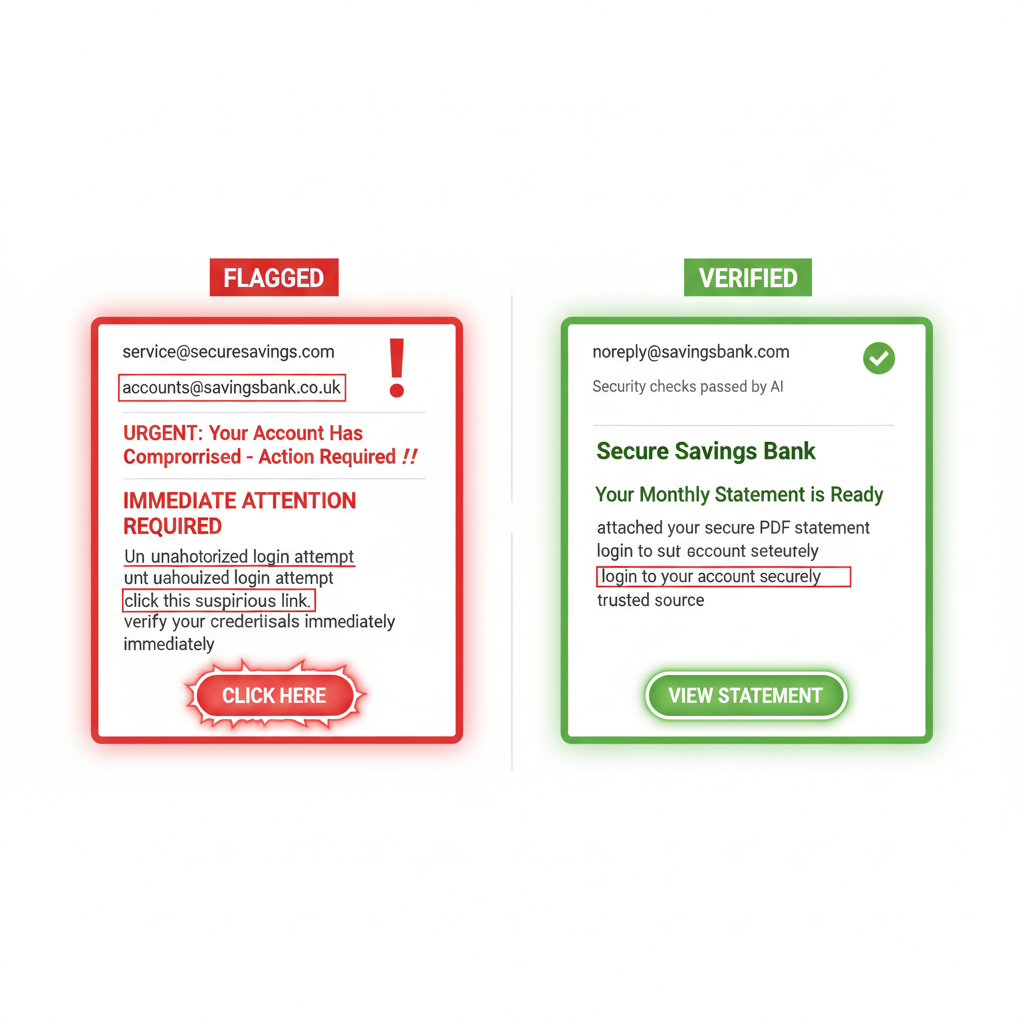
Phishing Protection
Your AI flags an email from “your bank” because the sender domain doesn’t match. The email says it’s from Chase, but the actual sending address is something like chase-secure-alert@notify-banking203.com. You might not notice that. Your AI always will.
It also checks links before you click them. If a link says it goes to amazon.com but actually redirects to a lookalike site, the AI catches the mismatch and warns you. It scans attachments for malware. It flags messages that use high-pressure language like “act now” or “your account will be closed in 24 hours”—phrases scammers rely on to get you to skip thinking and just click.
Voice Clone Detection
AI-powered call screening can flag suspicious calls in real time. Some tools analyze voice patterns for signs of synthetic generation—tiny artifacts that human ears miss but AI picks up. Others work by screening unknown callers, asking them to verify who they are before the call reaches you.
The practical advice an AI assistant can reinforce: if a family member calls asking for money in an emergency, hang up and call them back at their real number. An AI reminder at the right moment can stop a panic-driven mistake.
Tech Support Scam Blocking
AI tools monitor your browser and flag fake virus warnings before you can act on them. They recognize the patterns: the full-screen popup, the flashing warnings, the phone number that definitely doesn’t belong to Microsoft. The AI can block the popup, close the tab, and remind you that real tech companies never ask you to call a number from a popup.
If someone requests remote access to your computer, your AI can flag the request and explain the risk before you grant permission.
Romance Scam Red Flags
AI can run a reverse image search on a dating profile photo in seconds, checking whether that picture belongs to someone else entirely. It can flag common romance scam patterns in messages—quick escalation to love, excuses for never video-chatting, and the inevitable pivot to money.
It won’t tell you who to date. But it can give you a heads-up when something doesn’t add up.
5 Things Your AI Watches For
- Mismatched sender addresses — The display name says “Bank of America” but the email address is from a random domain. AI catches this every time.
- Suspicious links — Before you click, AI checks where a link actually goes. If the destination doesn’t match what’s displayed, you get a warning.
- Urgency and pressure language — Phrases like “immediate action required,” “your account will be locked,” or “don’t tell anyone” are textbook scam tactics. AI flags them.
- Requests for remote access — Any time a program or caller asks to control your screen, AI steps in with a clear warning about the risk.
- Too-good-to-be-true patterns — Guaranteed investment returns, lottery winnings you never entered, inheritance from a stranger. AI recognizes these templates because they’ve been used millions of times before.
DIY Security vs. Professional AI Setup
You can absolutely set up some of these protections yourself. Free tools exist. Spam filters catch some phishing. Built-in browser warnings block some bad websites. If you’re comfortable researching and installing security software, adjusting settings, and keeping everything updated, the DIY route can work.
But here’s what we see over and over: the DIY approach leaves gaps.
“I had antivirus software and a spam filter. I still almost wired $3,000 to someone pretending to be my grandson. The email filter doesn’t help when the scam comes through a phone call.” — ClearSetup AI client, age 68
The challenge isn’t any single tool. It’s getting everything working together—email scanning, call screening, browser protection, password management—and keeping it updated as threats change. That’s a part-time job most people don’t want.
What a Professional Setup Gets You
With a service like ClearSetup AI, someone configures the full protection stack for you. Not just one tool, but a coordinated system built around how you actually use your devices. The setup follows established security frameworks like those recommended by NIST (National Institute of Standards and Technology), adapted for home use rather than corporate IT departments.
You get:
- AI email filtering tuned to catch the latest phishing techniques
- Call screening that stops robocalls and flags suspicious callers
- Browser protection that blocks fake websites and scam popups
- Password management so you’re not reusing the same password everywhere
- Ongoing monitoring that adapts as new scam types appear
- A real person to call when something feels off
The difference is the same as doing your own taxes vs. hiring an accountant. Both can work. But one comes with a lot less stress and a lot fewer mistakes.
Getting Started With AI Scam Protection
You don’t need to understand how AI works to benefit from it. You just need it set up correctly and working in the background.
If you want to learn more about what AI assistants can do beyond security—helping with daily tasks, reminders, health management—read our complete guide to AI personal assistants for adults over 55.
If you already know you want protection and don’t want to piece it together yourself, ClearSetup AI can get your entire household set up with elder fraud prevention AI tools in a single session. Everything configured, tested, and explained so you know exactly what’s protecting you.
Scammers are using AI against you. It’s time to use it right back.
Frequently Asked Questions
How much does AI scam protection cost?
It depends on the approach. Free tools like Gmail’s built-in spam filter and browser warnings provide basic coverage. Paid security suites run $50–$150 per year. A professional setup service like ClearSetup AI is a one-time investment that gets everything configured correctly from the start, which often saves money compared to paying for multiple separate subscriptions.
Can AI really detect voice cloning scams?
Detection of cloned voices is improving fast. Some tools can identify synthetic speech by analyzing audio patterns that sound natural to us but contain tiny inconsistencies machines can spot. The more practical protection right now is AI-powered call screening that filters suspicious callers before they ever reach you, combined with the habit of calling family back at their known number.
Will AI scam protection slow down my computer or phone?
Modern AI security tools are designed to run quietly in the background. You shouldn’t notice any slowdown during normal use. Most of the heavy processing happens in the cloud, not on your device. If a tool does slow things down, that’s a sign it wasn’t set up well—another reason professional configuration matters.
What should I do if I think I’ve already been scammed?
Act fast. Contact your bank or credit card company to freeze accounts or reverse charges. File a report with the FBI’s IC3 and the FTC. Change passwords on any accounts that may be compromised. Then get proper AI protection set up so you’re covered going forward.
Do I need to be tech-savvy to use AI security tools?
Not at all. The best AI protection works invisibly—you don’t interact with it unless it flags something. It just watches, checks, and warns you when needed. That said, the initial setup does require some technical knowledge, which is exactly why services like ClearSetup AI exist. They handle the technical part so you get the protection without the headache.
Ready to Get Started?
Book a free 20-minute consultation. We’ll show you exactly how a personal AI assistant can save you hours every week.
(855) 779-3797 · Available 24/7
Liked this article? Get the full guide free.
10 Extraordinary Things Your AI Assistant Can Do For You — a 15-page illustrated guide with real stories, practical examples, and the exact questions to ask your AI assistant.
No spam. Unsubscribe anytime. We respect your inbox.
Related Articles

7 Online Scams Targeting Adults Over 55 in 2026 (And How AI Stops Them)
The 7 most dangerous online scams targeting older adults in 2026 — from AI-generated phishing to deepfake grandparent scams — and how a personal AI assistant can protect you from each one.
