

10 Things an AI Personal Assistant Can Do for You This Week
You’ve probably heard that AI assistants are changing how people manage their daily lives. But if you’re like most adults over 55, you might be wondering: what can an AI assistant do that’s actually useful to me?
Fair question. And the answer might surprise you. Today’s AI personal assistants don’t just answer trivia questions or tell jokes. With the right setup — especially on platforms like OpenClaw that connect your AI to real tools — they can take genuine action on your behalf. We’re talking about practical AI uses that save you real time, every single week.
Here are 10 things you can hand off to an AI assistant starting today. Not someday. This week.

1. Sort and Summarize Your Email Inbox
If your inbox has turned into a wall of unread messages, you’re not alone. Between newsletters, appointment confirmations, promotions, and the occasional message that actually matters, email can feel like a full-time job.
An AI assistant can scan your inbox each morning and give you a short summary: “You have three messages that need a reply — one from your doctor’s office, one from your insurance company, and one from your daughter. The rest are promotions and newsletters.” It pulls out what matters and skips what doesn’t.
Imagine starting your day knowing exactly which emails deserve your attention, without scrolling through 47 messages to find them. That’s one of the most popular AI assistant tasks people set up in their first week with an AI assistant.
2. Set Up Smart Medication Reminders
Basic phone alarms go off whether you need them or not. An AI assistant handles reminders with more flexibility. You can say, “Remind me to take my blood pressure medication every morning at 8, and bug me again at 8:15 if I haven’t confirmed.” It adapts to your routine instead of just beeping at you.
You can also ask it to keep a simple log. “Did I take my evening pills yesterday?” Instead of trying to remember, you have a record. For adults over 55 managing multiple prescriptions, this kind of AI help in daily life is a quiet game-changer.
And because platforms like OpenClaw can send messages through text or apps you already use, the reminders show up wherever is most convenient for you — not buried in some app you never open.
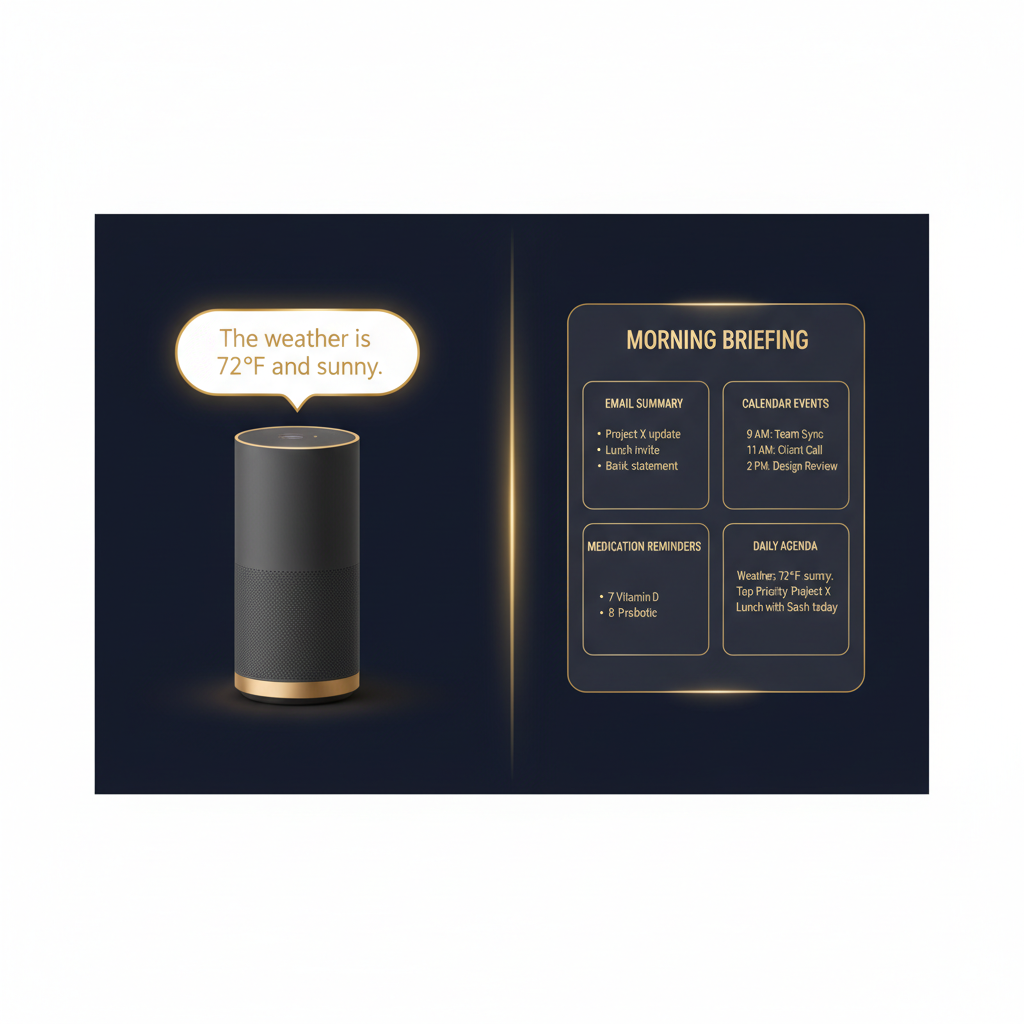
3. Get a Personalized Morning Briefing
What if you woke up to a short daily briefing tailored to your life? Not a generic news dump, but something like: “Good morning. It’s 62 degrees and sunny. You have a dentist appointment at 2 p.m. Your water bill is due Thursday. Your daughter posted new photos of the grandkids on Facebook.”
An AI assistant pulls from your calendar, your local weather, your accounts, and delivers a briefing that’s actually about your day. It takes about 30 seconds to read and sets you up for what’s ahead.
This is one of those practical AI uses that sounds small but feels surprisingly helpful once you’ve tried it for a few days. It replaces that scattered feeling of “what do I need to do today?” with a clear answer.
4. Draft a Reply to a Confusing Letter
You get a letter from your insurance company. It’s three pages of dense language that seems to say your coverage changed, but you’re not sure what it means or how to respond. Sound familiar?
You can photograph or scan the letter, share it with your AI assistant, and say, “What does this mean, and help me write a reply.” The assistant will break down the key points in plain language and then draft a clear, polite response you can review before sending.
This is where AI goes beyond chatbot territory. It’s not giving you a generic template. It’s reading your letter and writing your response. You stay in control — you review and send it — but the hard part of figuring out what to say is handled for you.
5. Find the Best Restaurant for Saturday Night
You want to take friends out for dinner. You need somewhere with good food, not too loud, decent parking, and available at 7 p.m. on Saturday. Normally this means 20 minutes of scrolling through reviews and calling around.
An AI assistant can research options based on your preferences, check recent reviews, and give you a short list with the highlights. “Here are three spots within 15 minutes of you. Option one has great Italian food and plenty of parking. Option two is quieter and has outdoor seating. Option three is the highest rated but tends to book up fast.”
You pick the one you like, and the assistant can even help you make the reservation. It’s AI help in daily life that feels like having a personal concierge.
6. Track Your Bills and Flag Upcoming Due Dates
Missed a payment lately? Not because you couldn’t afford it, but because you simply forgot? It happens to everyone. An AI assistant can watch your email for bill notifications and keep a running list of what’s due and when.
Each week, it can send you a quick summary: “Your electric bill of $142 is due Monday. Your credit card payment is due next Friday. Your car insurance auto-pays on the 15th — no action needed.” No more late fees from something slipping through the cracks.
For anyone managing multiple accounts and due dates, this is one of the most immediately valuable AI assistant tasks you can set up. It’s not fancy. It just works.
7. Research a Travel Destination
Planning a trip used to mean hours with guidebooks or travel websites. Now you can say, “I’m thinking about spending a week in Savannah, Georgia, in October. What should I know?”
Your AI assistant comes back with the weather outlook, top things to do, restaurant recommendations, hotel options in your budget, and practical tips like “October is a great time to visit — fewer crowds and comfortable temperatures.” It pulls from current sources and puts everything in one place for you.
Want to go deeper? Ask follow-up questions. “What about accessibility for someone with a walker?” or “Are there good day trips nearby?” The assistant keeps researching until you have what you need to make a decision.
8. Schedule Appointments Without the Back-and-Forth
Scheduling anything — a lunch, a doctor visit, a phone call with your financial advisor — usually involves a chain of messages. “How about Tuesday?” “Tuesday doesn’t work.” “What about Thursday afternoon?” It’s exhausting.
An AI assistant connected to your calendar can handle this for you. You tell it, “Schedule a lunch with Bob sometime next week. I’m free Monday, Wednesday, and Friday afternoons.” The assistant can draft the message to Bob, and once he picks a time, it goes on your calendar automatically.
This is a perfect example of what can an AI assistant do that goes beyond just answering questions. It’s taking real action — coordinating between people and managing your schedule so you don’t have to juggle it yourself.

9. Explain Confusing Documents in Plain English
Tax forms. Insurance notices. HOA rule changes. Investment statements. The amount of confusing paperwork that lands on your desk doesn’t slow down — if anything, it speeds up.
Your AI assistant can read any document you share and explain it in plain, clear language. “This insurance notice says your premium is going up by $12 per month starting in January. No action is needed on your part — it adjusts automatically.” Done. No Googling, no calling a helpline, no guessing.
For anyone dealing with healthcare paperwork, tax documents, or legal notices, this might be the single most useful thing on this list. You get clarity in seconds instead of confusion for days.
10. Send a Daily Check-In Message to Family
Want to stay in touch with your kids or grandkids without having to compose a message every single day? You can set up your AI assistant to send a simple check-in on your behalf. Something like, “Hi sweetie — all is well here. Had a nice walk this morning and made your grandmother’s soup recipe for dinner. Love you.”
You can review the message before it goes out, or let the assistant draft it based on what you’ve told it about your day. It keeps the connection alive without turning into one more thing on your to-do list.
This is one of those AI assistant tasks that’s less about productivity and more about quality of life. Staying connected matters, and a little help keeping up the habit goes a long way.
These Are Real Actions, Not Just Chatbot Answers
Here’s the important thing: everything on this list is something an AI assistant can actually do — not just talk about. The difference comes down to the platform. A basic chatbot can suggest a restaurant. An AI assistant running on a platform like OpenClaw can research options, compare reviews, and help you book a table.
That distinction matters. When people ask “what can an AI assistant do,” they’re usually imagining a smarter search engine. The reality, in 2026, is closer to having a capable personal assistant who works around the clock and never forgets a detail.
If you’re curious where to start, our complete guide to AI personal assistants walks through exactly how these tools work and which ones are worth your time.
Ready to see what an AI assistant can do for you? ClearSetup AI helps adults over 55 get started with a personal AI assistant — set up, configured, and running in your first week. No tech background needed. Visit ClearSetup AI to learn how we make it simple.
Frequently Asked Questions
What can an AI assistant do that a smartphone can’t already handle?
Your phone has individual apps for email, reminders, calendars, and search. An AI assistant connects all of them and works across everything at once. Instead of opening five different apps, you tell one assistant what you need and it handles the rest. It’s the difference between having tools and having someone who knows how to use them for you.
Is it safe to let an AI read my emails and documents?
Reputable AI platforms use encryption and privacy protections to keep your data secure. You also stay in control — you choose what the assistant can access, and you can review any action before it happens. It’s worth asking about privacy policies when choosing a platform, just as you would with any service that handles personal information.
Do I need to be tech-savvy to use an AI personal assistant?
Not at all. Modern AI assistants are designed to understand plain, everyday language. You don’t type commands or learn special codes. You write or speak naturally — “remind me about my pills” or “what bills are due this week” — and the assistant figures out the rest. Services like ClearSetup AI handle the technical setup so you can skip straight to the useful part.
How much does an AI personal assistant cost?
Costs vary depending on the platform and features. Some basic AI assistants are free, while more capable options that take real action — like managing your calendar or summarizing your email — typically run between $20 and $50 per month. Think of it like a subscription to a service that saves you several hours each week. For many people, that trade-off pays for itself quickly.
Ready to Get Started?
Book a free 20-minute consultation. We’ll show you exactly how a personal AI assistant can save you hours every week.
(855) 779-3797 · Available 24/7
Liked this article? Get the full guide free.
10 Extraordinary Things Your AI Assistant Can Do For You — a 15-page illustrated guide with real stories, practical examples, and the exact questions to ask your AI assistant.
No spam. Unsubscribe anytime. We respect your inbox.
Related Articles

7 Online Scams Targeting Adults Over 55 in 2026 (And How AI Stops Them)
The 7 most dangerous online scams targeting older adults in 2026 — from AI-generated phishing to deepfake grandparent scams — and how a personal AI assistant can protect you from each one.


The Ultimate Guide to AI Personal Assistants for Adults Over 55 (2026)
Discover how AI personal assistants help adults over 55 simplify daily life, stay secure online, and maintain independence in 2026.

AI Privacy Guide for Older Adults: What Happens to Your Data with ChatGPT, Alexa, and More
A plain-language privacy comparison of ChatGPT, Google Gemini, Apple Siri, Amazon Alexa, and private AI assistants. Includes privacy grades and step-by-step protection tips for adults over 55.