

From Beginner to Pro: How Your AI Assistant Grows with You
Here’s something nobody tells you about AI assistants: you don’t need to figure everything out on day one.
Think about how you learned to use your smartphone. You probably started with phone calls and texts. Then you added photos, maybe maps. Eventually you were video calling your grandkids, ordering groceries, and checking your bank balance — all from that same phone.
Your AI personal assistant works the same way. It meets you where you are, and it grows with you at whatever pace feels comfortable. There’s no test at the end. No deadline. Just a tool that gets more useful the more you use it.
This guide walks you through three natural phases of the AI learning curve — from your first week asking simple questions to the point where your assistant handles travel plans, tracks your health data, and keeps your whole family’s calendar straight. Each phase builds on the last, and you move forward only when you’re ready.
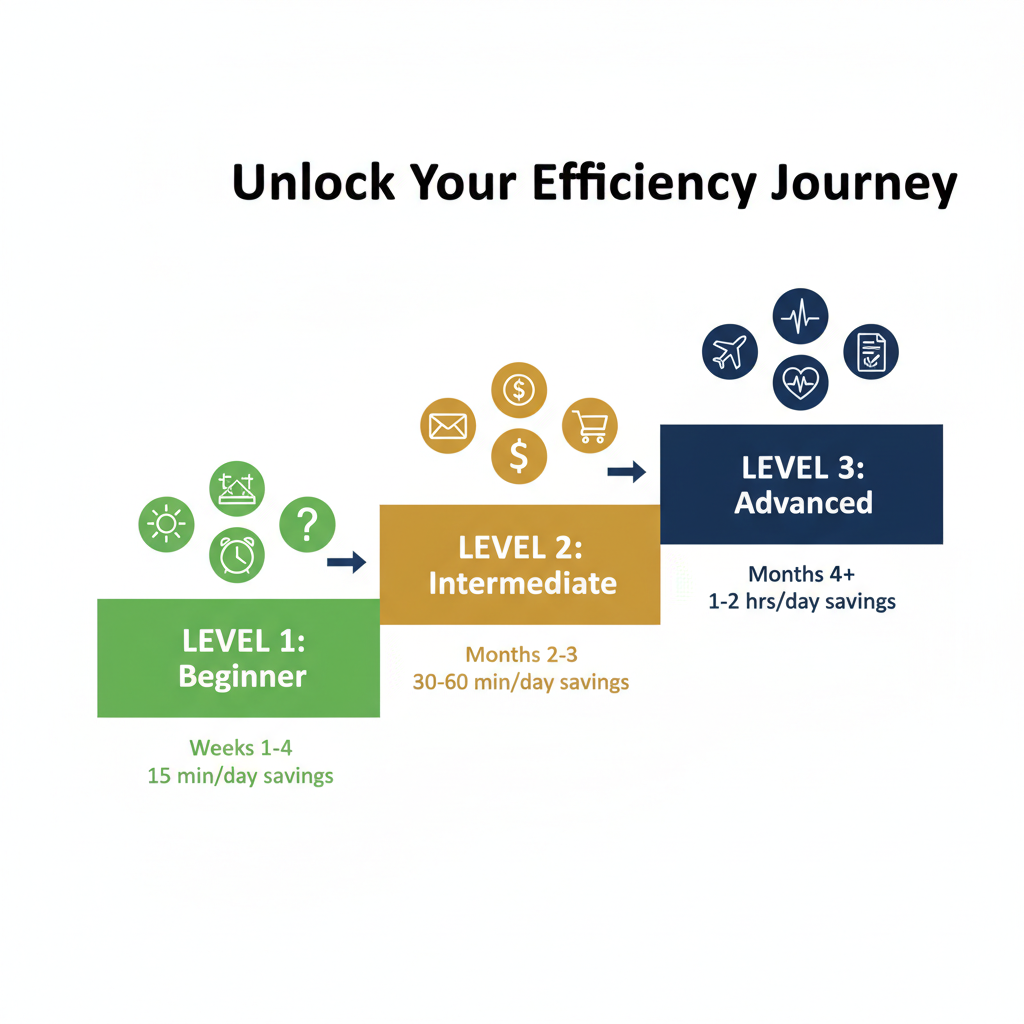
Phase 1: Getting Comfortable (Weeks 1–4)
What This Phase Looks Like
The first month is about building a habit. You’re not trying to become a power user. You’re just getting used to talking to your assistant and seeing what happens.
Most adults over 55 start with the basics — and that’s exactly right. During your first week with an AI assistant, you’ll likely stick to a handful of tasks that feel safe and straightforward.
What You’ll Actually Do
- Morning briefings: Ask your assistant what’s on your calendar today, what the weather looks like, and whether any important emails came in overnight.
- Weather checks: “Do I need a jacket today?” or “What’s the forecast for the weekend?”
- Reminders: “Remind me to take my medication at 2 PM” or “Remind me to call Dr. Patel on Thursday.”
- Basic Q&A: “What time does the post office close?” or “How many cups are in a quart?”
- Email sorting: Your assistant can flag the emails that actually matter and push the junk aside.
Real Example
Barbara, 67, started by asking her AI assistant for the weather each morning and setting medication reminders. “For the first two weeks, that was all I did,” she says. “But it worked perfectly every time, and that gave me confidence to try more.”
Time Saved
Even at this stage, expect to save about 15 minutes a day. That’s mostly from not hunting through emails, not looking up the weather on three different apps, and not forgetting things you needed to do.
When You’re Ready to Move Up
You’ll know it’s time for the next phase when talking to your assistant feels natural — when you catch yourself thinking, “I should ask my assistant about that.” No rush. Some people get there in two weeks. Some take two months. Both are fine.
Phase 2: Building Confidence (Months 2–3)
What This Phase Looks Like
This is where things start to click. You trust your assistant with the basics, so now you hand it slightly bigger jobs. The AI features progression at this stage is noticeable — you’ll start wondering how you managed without it.
What You’ll Actually Do
- Email drafting: Instead of just sorting emails, your assistant drafts replies. You review them, tweak a word or two, and send. A task that used to take 10 minutes of staring at a blank screen now takes 30 seconds.
- Bill tracking: “When is my electric bill due?” or “How much did I spend on subscriptions last month?”
- News summaries: Instead of scrolling through five news sites, ask for a quick summary of today’s headlines — or just the topics you care about.
- Restaurant help: “Find me an Italian restaurant near downtown that’s not too loud and takes reservations for Saturday night.”
- Shopping lists: Build running lists by voice. “Add paper towels and olive oil to my grocery list.”
- Video call scheduling: “Set up a Zoom call with my son for Sunday afternoon and send him the link.”
Real Example
Tom, 72, spent his first month on reminders and weather. By month two, he asked his assistant to help draft an email to his insurance company about a billing dispute. “It wrote something better than I would have — polite but firm. I changed one sentence and hit send. That would’ve taken me an hour on my own.”

Time Saved
At this level, you’re saving 30 to 60 minutes a day. The email drafting alone is a game changer, and having your assistant handle scheduling means fewer back-and-forth messages with family and friends.
When You’re Ready to Move Up
You’ll notice the shift when you start asking your assistant open-ended questions — not just “set a reminder” but “help me figure out the best option.” That curiosity is the signal that you’re ready for the advanced phase.
Phase 3: Running the Show (Months 4+)
What This Phase Looks Like
This is the payoff. Your assistant isn’t just answering questions anymore — it’s actively managing parts of your daily life. Seniors who reach this phase often describe it like having a personal secretary who never takes a day off.
What You’ll Actually Do
- Travel planning: “Plan a 5-day trip to Savannah in October. I want a hotel near the historic district, restaurant recommendations, and a day-by-day itinerary. Keep the budget under $2,000.”
- Health monitoring: Track appointments, medication schedules, blood pressure readings, and doctor’s instructions in one place. Your assistant can even prep questions before a doctor visit.
- Document summarization: Hand your assistant a 20-page insurance policy or benefits document and ask, “What do I actually need to know?”
- Financial tracking: Monthly spending summaries, subscription audits, and simple budget tracking — without spreadsheets.
- Formal correspondence: Letters to attorneys, insurance appeals, complaint letters, thank-you notes for formal occasions. Your assistant handles tone and formatting.
- Family calendar coordination: Birthdays, anniversaries, school events, family dinners — all tracked and synced so nothing falls through the cracks.
Real Example
Linda, 63, planned her entire anniversary trip to Charleston through her AI assistant. It researched hotels, compared prices, suggested restaurants based on her dietary restrictions, and built a printed itinerary she could carry in her purse. “My husband thought I hired a travel agent.”
Time Saved
At the advanced level, your assistant saves you 1 to 2 hours every day. That’s real time back — for hobbies, for family, for whatever matters most to you.
For a full rundown of what’s possible, check out our list of 10 things your AI assistant can do that might surprise you.
The Part Nobody Talks About: Your AI Is Patient
Your assistant won’t judge you for asking the same question twice. It won’t sigh when you forget how to do something. It won’t rush you through a task because it has somewhere else to be.
This might sound obvious, but it changes everything — especially for adults over 55 who’ve been burned by tech that felt hostile or confusing. Your AI assistant is designed to wait, to repeat, and to explain things as many times as you need.
There’s no wrong pace. The person who spends six months in the beginner phase is using their assistant just as correctly as the person who races ahead in three weeks.
How Professional Support Speeds Things Up
You can absolutely work through these phases on your own. Plenty of people do. But having someone in your corner makes the whole process smoother — and less stressful.
That’s what ClearSetup AI does. Their team helps adults over 55 set up their AI assistant, learn the basics, and grow into more advanced features at a comfortable pace. Think of it as having a friendly tech-savvy neighbor on speed dial.
Professional support is especially helpful when you’re:
- Moving from one phase to the next and not sure what to try
- Stuck on a task and getting frustrated
- Wanting to use a feature but not confident enough to try it alone
- Setting up integrations like email, calendar, or health tracking
You don’t need to struggle through upgrading your AI assistant experience by yourself. A quick session with a real person can save you hours of trial and error.
Frequently Asked Questions
How long does it take to go from beginner to advanced with an AI assistant?
Most people reach the advanced phase in about four to six months, but there’s no fixed timeline. Some move faster, some take longer. The AI assistant beginner to advanced path depends entirely on how often you use it and what feels comfortable. There’s no wrong speed.
What if I get stuck and can’t figure out a feature?
That’s completely normal. Your AI assistant can walk you through most tasks step by step. If you’re still stuck, services like ClearSetup AI offer one-on-one support to help you through the tricky parts without any judgment.
Do I need to be good with technology to use an AI assistant?
Not at all. If you can have a conversation, you can use an AI assistant. The beginner phase is designed for people with zero tech background. You start with plain questions — “What’s the weather?” — and build from there. No typing commands, no learning code.
Will my AI assistant forget what I’ve taught it if I take a break?
Most modern AI assistants remember your preferences and settings even if you step away for a while. When you come back, you pick up where you left off. Taking a break doesn’t set you back to zero.
Your Next Step
Wherever you are right now — curious, cautious, or somewhere in between — there’s a starting point that fits. The AI learning curve is gentler than you think, and the payoff builds quickly once you get going.
Start with one task. Ask about the weather. Set a reminder. See how it feels. Then try one more thing tomorrow. That’s honestly all it takes.
If you want guidance along the way, our complete guide to AI personal assistants covers everything from choosing the right assistant to getting the most out of it long term.
Your AI assistant is ready when you are. And it’ll be just as ready next week, next month, or whenever the moment feels right.
Ready to Get Started?
Book a free 20-minute consultation. We’ll show you exactly how a personal AI assistant can save you hours every week.
(855) 779-3797 · Available 24/7
Liked this article? Get the full guide free.
10 Extraordinary Things Your AI Assistant Can Do For You — a 15-page illustrated guide with real stories, practical examples, and the exact questions to ask your AI assistant.
No spam. Unsubscribe anytime. We respect your inbox.
Related Articles

The Ultimate Guide to AI Personal Assistants for Adults Over 55 (2026)
Discover how AI personal assistants help adults over 55 simplify daily life, stay secure online, and maintain independence in 2026.


Your First Week with an AI Assistant: A Day-by-Day Guide
Not sure what to expect? Here is exactly what your first seven days with an AI personal assistant look like, one simple step at a time.

How to Set Up an AI Assistant for Your Parents: Complete 2026 Guide
A complete guide to setting up an AI personal assistant for your parents or older loved ones. Covers free tools, voice assistants, and managed AI services — with privacy, cost, and ease-of-use comparisons.