How to Use OpenClaw as a Personal Project Manager
OpenClaw gives solo operators, freelancers, and small teams a chat-native project layer: capture tasks, track status, get deadline nudges, and draft updates. You stay in control with an approval gate before any client or team message goes out.
Tasks get buried in chat, email, calls, and notes, and the work that matters slips a day at a time. A personal project manager fixes that by turning scattered messages into projects, owners, due dates, and status updates you can actually see. OpenClaw runs that layer right inside the chat apps you already use, drafting client and team updates and waiting for your approval before anything is sent.
OpenClaw can work as a personal project manager by turning chat messages into structured projects, tasks, deadlines, blockers, reminders, and status updates. Use it to capture work in the moment, run deadline nudges, create weekly rollups, and draft client or team updates that you approve before anything is sent.
Most advice about a personal project manager stops at "use a better app." That misses the real problem. The work does not live in one app. It lives in Slack threads, voice notes, email replies, and half-finished to-do lists. This guide shows how to use OpenClaw as a chat-native AI project manager that captures tasks where they appear, tracks status, nudges deadlines, and prepares updates you control. You get a task model, a deadline nudge cron, a status-update draft prompt, and an approval gate before any external message goes out.
- A personal project manager turns goals into projects, tasks, owners, due dates, statuses, blockers, and updates. With OpenClaw that system lives in chat.
- OpenClaw acts as an AI project manager for the admin work: capture, reminders, blocker tracking, rollups, and draft updates. You keep judgment and approval.
- The core schema is a task management AI agent contract: Project, Objective, Task, Owner, Due date, Status, Priority, Blocker, Dependency, Last update, Next action, Approval needed.
- A weekday deadline nudge cron (0 9 * * 1-5) keeps overdue and at-risk work visible before the day fills up.
- The trust rule is an approval gate before client and team messages: OpenClaw drafts freely, but you approve before anything is sent.
Start here: make OpenClaw your personal project manager#
The fastest way to think about a personal project manager is this: it is the system that catches a commitment the moment it is made and keeps it visible until it is done. Most solo operators, freelancers, and small teams do not lose work because they are lazy. They lose it because the task showed up in a message and never made it onto a list. Asana found that knowledge workers spend roughly 60% of their time on work about work, the chasing, searching, and status updates that surround the actual job.
OpenClaw is a strong fit because it is a personal AI assistant you run on your own devices and answer through channels you already use. That means your personal project manager does not live in a separate tab you forget to open. It lives in Slack, Telegram, WhatsApp, Microsoft Teams, Google Chat, Discord, Signal, and more, right where the work is discussed. You message a commitment, the agent files it, and it surfaces again when the deadline gets close.
- ·Commitments live in chat threads, email, and call notes that no one revisits.
- ·Deadlines surface only when something is already late.
- ·Status updates get written from scratch under pressure.
- ·Client and team messages go out inconsistently, when there is time.
- ▸Every commitment becomes a task with an owner, due date, and status.
- ▸A morning nudge shows overdue and at-risk work before the day fills up.
- ▸Status updates are drafted from real task data in seconds.
- ▸Every client or team message waits at an approval gate before it is sent.
The promise of this workflow is concrete: one personal project manager system for daily execution, weekly rollups, and safer stakeholder updates. The rest of this guide builds it piece by piece, starting with the difference between a simple reminder tool and a real AI project manager.
AI to-do manager vs AI project manager: know the difference#
It helps to be precise about search intent here, because the two terms get blurred. An AI to-do manager captures and reminds you about tasks. An AI project manager does that and more: it groups tasks into projects, tracks milestones, detects blockers, summarizes status, and prepares stakeholder updates. The jump from a list to a project layer is where most of the value lives.
| Capability | AI to-do manager | Full PM app | OpenClaw as AI project manager |
|---|---|---|---|
| Capture from chat | Manual entry | Manual entry | Captures from the messages you already send |
| Group into projects | Flat list | Yes | Yes, with objective and owner per task |
| Track blockers and dependencies | No | Partial | Yes, flagged in the schema |
| Deadline nudges | Basic reminders | Notifications | Scheduled cron with next-action prompts |
| Draft status updates | No | Templates | Drafts from real task data, held for approval |
| Approval before sending | Not applicable | Not applicable | Required for every client or team message |
OpenClaw fits the AI project manager column when work arrives through chat and needs status, deadlines, context, and approval gates. APM, the professional body for project management, found that project professionals report AI benefits in task and schedule automation, reporting and dashboarding, and stakeholder communications. Those are exactly the three jobs an AI to-do manager cannot do on its own.
OpenClaw project management architecture#
The setup is lighter than it sounds. OpenClaw project management works by routing messages from your chat channels into the agent, which then classifies tasks, deadlines, blockers, and approvals against your task store. The OpenClaw docs describe the Gateway as the single source of truth for sessions, routing, and channel connections, so it is the control plane that ties everything together.
- 1Messages from supported channels flow into the Gateway, the control plane for sessions and routing.
- 2Project memory and a task table hold the structured record of every commitment.
- 3A calendar or cron feeds due dates and triggers scheduled deadline scans.
Keep the wiring simple. The recommended components are project memory, a task table, a calendar or cron, a status draft queue, and an approval queue. OpenClaw supports a wide set of channels including WhatsApp, Telegram, Slack, Discord, Google Chat, Signal, iMessage, Microsoft Teams, and Matrix, so you can run all of this from a channel you already check.
Task capture and status model: the core schema#
This is the operating model that turns OpenClaw into a reliable task management AI agent. Without a schema, the agent guesses. With one, it captures the right fields every time and knows when to ask. PMI defines a project as a temporary endeavor to create a unique result, which is exactly why a task needs an objective and an owner, not just a title.
The capture rule is simple: create or update a task when a message includes a commitment, owner, due date, blocker, dependency, or next action. If a key field is missing, the agent asks one concise follow-up instead of guessing.
- 1Each project holds an objective and an owner so tasks ladder up to a real outcome.
- 2Every task card carries priority and a due date so nudges and rollups have something to measure.
- 3Blocker and dependency markers tell the agent when work is stuck or waiting on someone else.
Use these fields as the full task schema: Project, Objective, Task, Owner, Due date, Status, Priority, Blocker, Dependency, Last update, Next action, Approval needed. The status model is a short lifecycle the agent moves a task through.
| Status | What it means | Agent behavior |
|---|---|---|
| Inbox | Captured, not triaged yet | Ask for missing fields, then move to Next |
| Next | Ready to start, not started | Surface in the morning plan |
| In progress | Active work | Track last update and next action |
| Waiting | Blocked on someone else | Nudge the dependency owner, not you |
| Blocked | Stuck on an issue | Escalate in the rollup, flag risk |
| Review | Done, needs a check | Queue for approval or QA |
| Done | Complete | Stop nudging, log for the rollup |
| Archived | Closed and filed | Never nudge, restore on request |
That lifecycle is what stops the agent from nagging about finished work and lets it focus nudges on the tasks that are actually at risk.
Deadline nudge cron: keep due dates visible#
A deadline nudge cron is the automated loop that prevents tasks from going stale. Asana found that 88% of knowledge workers agree time-sensitive projects and large initiatives have fallen behind or slipped through the cracks because of task volume. A scheduled scan is the cheapest way to catch slippage before it becomes a missed commitment.
- 1Schedule a weekday morning scan2 min
Run a scan every weekday morning so at-risk work surfaces before the day fills up. Start conservative and tune later.
cron0 9 * * 1-5 - 2Define what the scan looks for5 min
Overdue tasks, tasks due in the next forty-eight hours, waiting tasks, and any task with no next action.
- 3Set the nudge format5 min
For each task: project, task, due date, current status, recommended next action, and quick choices for done, snooze, reschedule, or blocked.
- 4Add the escalation rule5 min
Nudge the owner in private first. Draft a stakeholder update only when a deadline risk affects a client or team commitment, and hold it for approval.
- 5Add the do-not-nag rule3 min
Never nudge completed, archived, or intentionally parked work. This is what keeps OpenClaw project management useful instead of noisy.
The escalation rule matters most. A private nudge to you is low stakes. A message to a client is not, so that path always routes through a draft and an approval, never an automatic send.
Status-update draft prompt for clients and teams#
This is the part that saves the most time and carries the most risk, so the design keeps the draft useful and the send under your control. APM lists reporting and dashboarding plus stakeholder communications among the top reported AI benefits for project professionals, and a good status update prompt delivers both.
Copy this prompt and adapt the bracketed fields.
Draft a status update for [project]. Include summary, completed work, next steps, dates at risk, blockers, decisions needed, and open questions. Use a calm, concise tone. Reference the source tasks. Do not send. Ask me to approve, edit, schedule, or cancel.Two rules make the draft trustworthy. First, require source tasks or task references in the draft when possible, so you can verify the message before approval. Second, make the draft useful even when no external message is needed by saving it as the internal project log. That way the work is never wasted, whether or not it ends up going to a client or team.
Approval gate before client and team messages#
Human control is the trust hook for any AI project manager, and it has a specific shape here. OpenClaw can draft external messages, but it cannot send them until you approve. OWASP identifies risks for LLM and agentic applications, including prompt injection and excessive agency, and an approval gate is the simplest defense against an agent overstepping. NIST AI RMF 1.0 provides the broader framework for trustworthy and responsible AI risk management that this pattern fits inside.

When a draft is ready for an external send, attach the approval fields so the decision is easy: recipient, channel, reason, source tasks, risk level, exact draft, send time, and approval status. Your decision options are approve, edit, schedule, cancel, or ask for more context.
Weekly project rollup: your Friday control panel#
Daily capture only pays off if you step back once a week to see the whole portfolio. Every Friday, have OpenClaw summarize all active projects by status, completed tasks, overdue work, upcoming deadlines, blockers, and decisions needed. Asana found that only 43% of respondents are clear on their organization's objectives for the year, and a weekly rollup is a small habit that keeps your own goals from drifting out of focus.
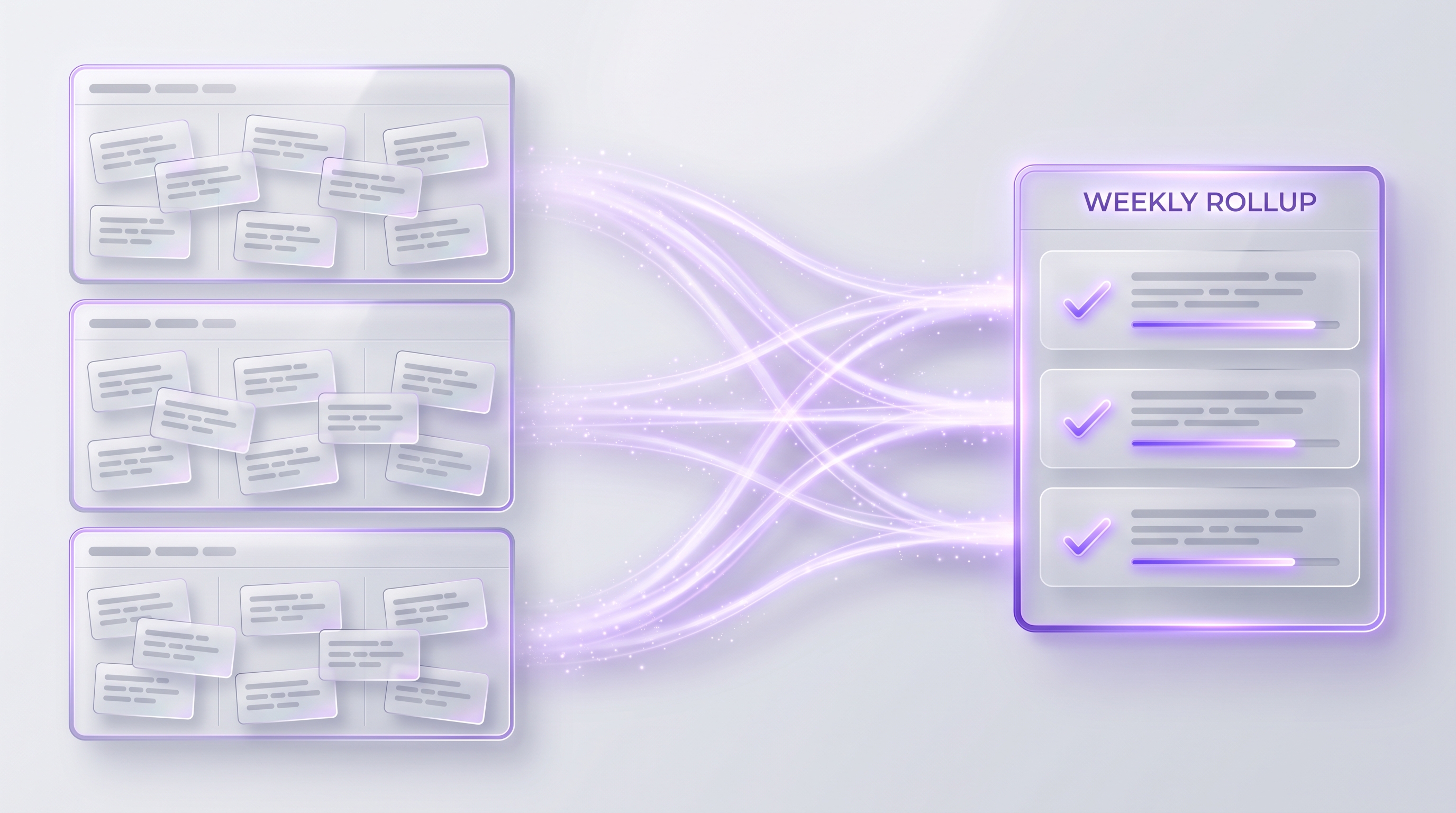
Create a weekly project rollup for all active projects. Group by Green, Yellow, Red. Include wins, risks, next week focus, and drafts that need approval. Do not send external messages.Use the rollup to spot stale work, prepare client updates, and decide what to start, stop, or delegate. If you want the full cadence around it, you can create an OpenClaw weekly review that pairs the rollup with a personal retrospective.
Daily and weekly cadence for OpenClaw project management#
A personal project manager only works if it becomes a rhythm. APM reports that 82% of people working in projects are using AI more frequently than they anticipated five years ago, and the operators who get the most from it run a simple, repeatable loop. Here is a cadence you can start tomorrow.
- MorningPlan three priorities
Pick the three tasks that matter most and inspect upcoming deadlines.
- MiddayBlocker check
Review waiting-for items and clear or escalate anything stuck.
- End of dayLog and update
Log completed work, update statuses, and capture tomorrow’s next actions.
- FridayWeekly rollupapprove
Run the weekly project rollup and clear the approval queue.
- MonthlyTune the system
Archive done work, review recurring blockers, and improve the capture rules.
The cadence is the system. Tasks get captured as they appear, deadlines stay visible, and the approval queue gets cleared once a week instead of in a scramble.
Example workflows for solo operators, freelancers, and small teams#
The model is the same for everyone, but the value shows up differently depending on the work. APM reports that optimism around AI in project work has risen sharply, with 62% saying recent AI advancements would be very positive for their industry or sector. Here is where that value lands first.
Freelancer client projects with approved updates
You are my OpenClaw personal project manager for client work. Turn call notes and messages into tasks using the schema Project, Objective, Task, Owner, Due date, Status, Priority, Blocker, Dependency, Last update, Next action, Approval needed. Every Friday, draft a client status update per project with summary, completed work, next steps, dates at risk, blockers, and decisions needed. Reference the source tasks. Do not send. Ask me to approve, edit, schedule, or cancel.- ▸Before any client update is sent
- ▸Before any scope, price, or deadline is promised
- ▸Before any meeting is booked
- ▸Before any commitment is made to a client
- !Invented progress: require source tasks in every draft.
- !Missing fields: ask one follow-up instead of guessing.
- !Wrong tone: provide a calm, concise tone guide.
- !Stale tasks: refresh status before drafting the update.
The other audiences map cleanly onto the same pattern. A solo operator can launch a landing page and track copy, design, domain, analytics, and the launch checklist with blockers and next actions in one project. A small team can collect Slack decisions, track owners, and prepare approved async status notes for a channel. Good starter projects include a content calendar, a proposal pipeline, invoice follow-up, a product sprint, event planning, and client onboarding. If you want a broader menu of safe starting points, see these tasks to delegate to AI.
Guardrails that keep your AI project manager useful#
Trust is what makes a personal project manager something you actually keep running. OWASP's GenAI Security Project focuses on security risks for generative AI, LLMs, agentic systems, and AI-driven applications, and NIST AI RMF 1.0 is the formal framework for trustworthy and responsible AI risk management. You do not need a security team to apply the core ideas. You need five habits.
- Least privilege. Give OpenClaw only the channels, calendars, and files each project needs, and nothing more.
- Channel separation. Keep private planning notes apart from client-facing channels so a draft cannot leak into a live thread.
- Audit logs. Keep a record of captured tasks, status changes, draft messages, approvals, and cancellations.
- Rollback rules. Archived tasks can be restored, deleted tasks require confirmation, and external sends require approval.
- Clear ownership. OpenClaw is the operator for project admin. You are the final owner for judgment, promises, and stakeholder communication.
Frequently asked questions#
What is a personal project manager?
A personal project manager is a system that turns goals into projects, tasks, owners, due dates, statuses, blockers, and updates. With OpenClaw, that system lives in chat so work can be captured the moment it appears.
Can OpenClaw be an AI project manager?
Yes. OpenClaw can act as an AI project manager for PM admin work like task capture, reminders, blocker tracking, summaries, and draft updates. Keep human approval for client messages, scope changes, and judgment calls.
What should a task management AI agent track?
Track project, objective, task, owner, due date, status, priority, blocker, dependency, last update, next action, and approval needed. Those fields let OpenClaw create useful nudges and status updates without inventing details.
What is a good deadline nudge cron?
Start with 0 9 * * 1-5. That weekday morning scan can find overdue tasks, work due soon, waiting items, and tasks with no next action before the day gets crowded.
Should OpenClaw send client or team updates automatically?
No. Let OpenClaw draft updates, then require approval before anything goes to a client or team channel. The best workflow is draft, review, edit if needed, then approve or cancel.
How is an AI to-do manager different from an AI project manager?
An AI to-do manager captures tasks and reminders. An AI project manager adds projects, milestones, owners, blockers, risk, status reporting, and approval-controlled communication.
What is a weekly project rollup?
A weekly project rollup is a Friday summary of active projects, completed work, overdue tasks, upcoming deadlines, blockers, decisions needed, and draft updates waiting for approval.
Pick one active project, add the task capture and status model, schedule the deadline nudge cron, and turn on the approval gate. Run it for one week, then connect it to your weekly project rollup and scale OpenClaw across the rest of your projects.
Want the cadence that wraps around it? Read how to create an OpenClaw weekly review and browse more tasks to delegate to AI to pick your next safe win.
Want your own OpenClaw AI agent, set up right?
We install, secure, and maintain your personal AI agent on private infrastructure, tuned to exactly how you work. You get the power without managing the setup.
Book Your Free Setup Call→The Owner's Guide to Adopting AI the Right Way
A short, practical guide for entrepreneurs: how to take charge of your AI, what your first AI agent should do, and the mistakes that cost months of rework. Get it free.